
Project management does not have to feel like herding cats. It can feel clear. Visual. Even fun. With the right mix of Kanban, Scrum, and a sprinkle of AI automation, your projects can run smoother than your morning coffee.
TL;DR: Kanban helps you see your work and limit overload. Scrum keeps teams focused with short sprints and clear roles. AI automation removes repetitive tasks and gives smart insights. Combine all three, and you get faster delivery, less stress, and happier teams.
Let’s break it down into six simple and practical ways you can start today.
1. Visualize Everything with Kanban Boards
Kanban is visual. Very visual.
It is based on a simple idea: see your work to manage your work. You create columns. Usually:
- To Do
- In Progress
- Review
- Done
Each task becomes a card. The card moves from left to right.
That’s it. Simple. Powerful.
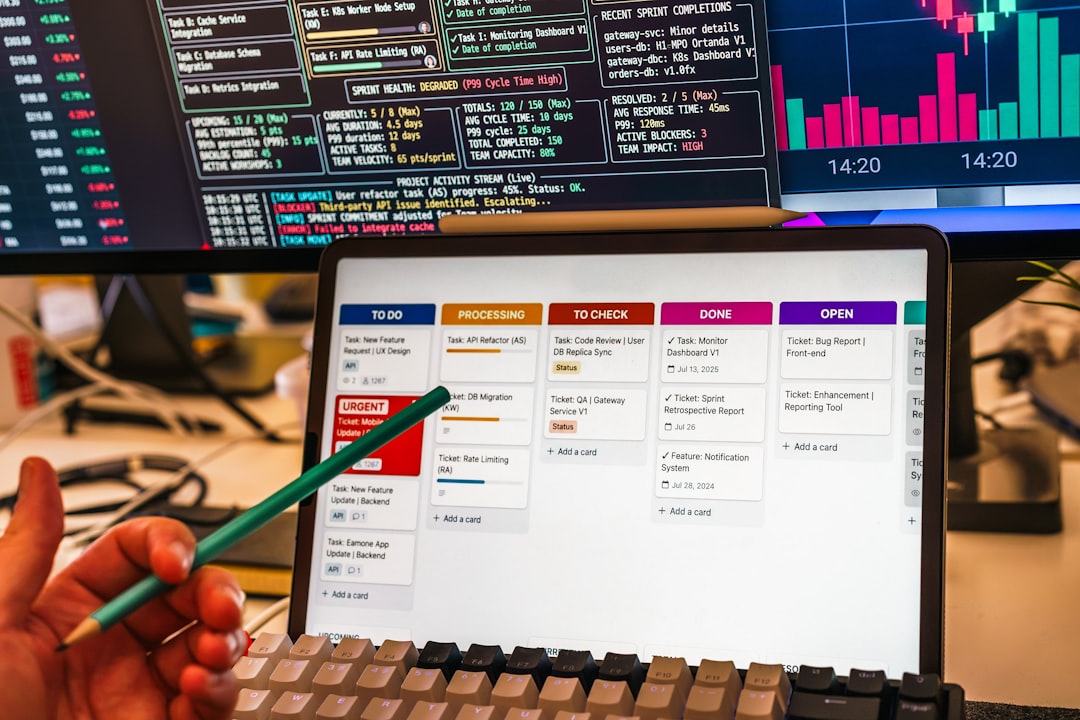
Why this works:
- You instantly see bottlenecks.
- You know who is working on what.
- You reduce chaos.
Tip: Keep your board clean. Too many columns create confusion. Start small. Improve later.
If your team works remotely, use tools like Trello, Jira, ClickUp, or Asana. Digital boards are easy to update. And everyone sees changes in real time.
Kanban is perfect for ongoing work. Marketing teams love it. Support teams love it. Anyone with a steady stream of tasks will love it.
2. Limit Work in Progress (WIP) to Avoid Burnout
This is where Kanban becomes magical.
You set a WIP limit. That means only a certain number of tasks can sit in “In Progress” at the same time.
For example:
- Design column → Max 3 tasks
- Development → Max 5 tasks
- Review → Max 2 tasks
If the column is full, no one starts new work.
Sounds strict? It works.
Why?
- Multitasking kills productivity.
- Context switching wastes time.
- Focused teams finish faster.
AI tools can help here too. Some platforms analyze workflow and suggest better WIP limits based on team performance. They look at past cycle times and predict overload before it happens.
This means fewer late nights. Less burnout. Better results.
3. Run Short Sprints with Scrum
Now let’s talk Scrum.
Scrum works in short cycles called sprints. Usually 1–2 weeks. During that time, the team focuses only on selected tasks.
No random new requests. No distractions.
At the start of the sprint, the team picks items from the backlog. At the end, they deliver something usable.

Key Scrum roles:
- Product Owner – Decides what to build.
- Scrum Master – Removes obstacles.
- Development Team – Builds the product.
Scrum also includes:
- Daily stand-ups (15-minute check-ins)
- Sprint reviews
- Retrospectives
Scrum works best for complex projects. Think software development. Or launching a new product.
AI can improve Scrum too. Some tools analyze sprint velocity. They predict if you are overcommitting. They even suggest which backlog items fit best into the next sprint based on team capacity.
That’s like having a smart assistant in every planning meeting.
4. Automate Repetitive Tasks with AI
This is where things get exciting.
AI automation is like hiring a robot intern. One that never sleeps.
Here are easy wins:
- Automatic task assignment based on workload
- Due date reminders
- Status updates posted to Slack or Teams
- Generating meeting summaries
Imagine finishing a sprint review. The AI listens. Then it creates:
- Meeting notes
- Action items
- Assigned tasks
No manual typing. No forgotten details.

AI can also:
- Predict project delays
- Highlight risky tasks
- Suggest process improvements
This frees your team to focus on creative and strategic work. Not admin.
Automation does not replace people. It supports them.
5. Combine Kanban and Scrum (Yes, You Can)
You do not have to choose one.
Many teams use a hybrid model called Scrumban.
How it works:
- Use Scrum sprints for planning and structure.
- Use a Kanban board to visualize daily work.
- Apply WIP limits to stay focused.
This gives you flexibility and discipline.
Example:
You plan a two-week sprint. During that sprint, tasks move across a Kanban board. If “In Progress” is full, no new tasks get started.
Simple system. Big impact.
AI enhances this hybrid approach by:
- Tracking sprint metrics
- Analyzing flow efficiency
- Recommending workflow adjustments
You get data-backed decisions instead of guesswork.
6. Use Data to Continuously Improve
Great teams improve constantly.
Kanban gives you metrics like:
- Cycle time
- Lead time
- Throughput
Scrum gives you:
- Velocity
- Sprint burndown charts
AI ties everything together.
It spots patterns humans miss. It answers questions like:
- Why are tasks stuck in review?
- Which type of work causes delays?
- When is the team most productive?
Instead of reacting to problems, you prevent them.
During retrospectives, use this data. Base discussions on facts. Not opinions.
That is how good teams become great teams.
Tool Comparison Chart
Here’s a simple comparison of popular tools that support Kanban, Scrum, and AI automation:
| Tool | Best For | Kanban | Scrum Support | AI Features | Ease of Use |
|---|---|---|---|---|---|
| Trello | Simple task management | Excellent | Basic | Limited integrations | Very Easy |
| Jira | Software teams | Advanced | Excellent | Strong analytics and AI add-ons | Moderate |
| ClickUp | All-in-one teams | Excellent | Strong | Built-in AI assistant | Easy |
| Asana | Marketing and operations | Strong | Moderate | Workflow automation and AI summaries | Easy |
| Monday.com | Custom workflows | Strong | Moderate | Automation and AI insights | Easy |
Quick tip: Choose Jira for deep Scrum. Choose Trello for simplicity. Choose ClickUp or Monday if you want built-in AI features.
Final Thoughts
Managing projects does not need to feel overwhelming.
Start with visibility. That’s Kanban.
Add structure. That’s Scrum.
Layer on intelligence. That’s AI automation.
Together, they create a system that is:
- Transparent
- Focused
- Efficient
- Adaptable
You do not need to implement everything at once.
Start with a board. Add WIP limits. Try one sprint. Automate one repetitive task.
Small improvements stack up.
Before you know it, your projects move faster. Your meetings get shorter. Your team feels calmer.
And that is the real goal.
Better work. Less stress. Smarter systems.